Adding a more capable Desktop to Alpine 3.23 (256MB tier)
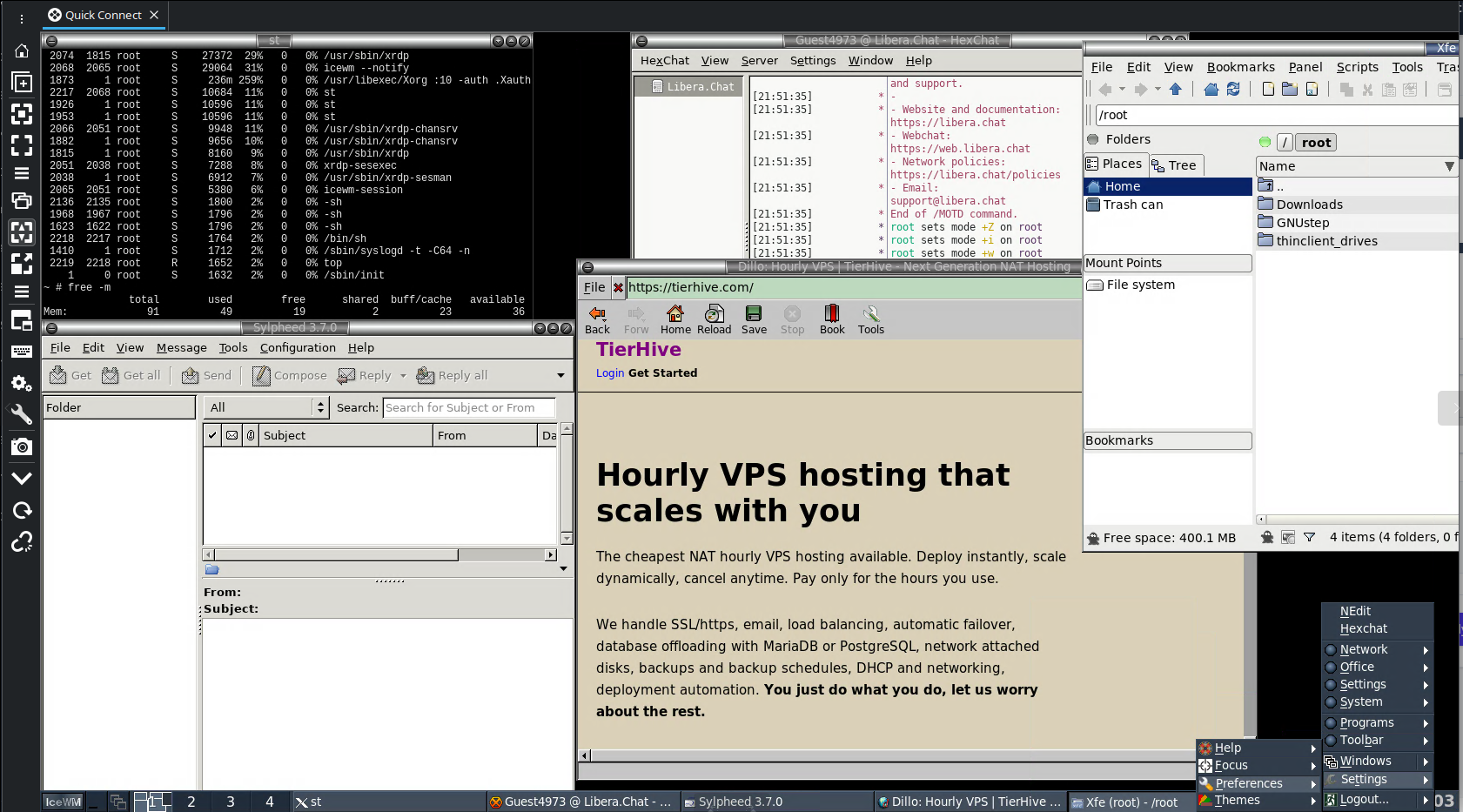
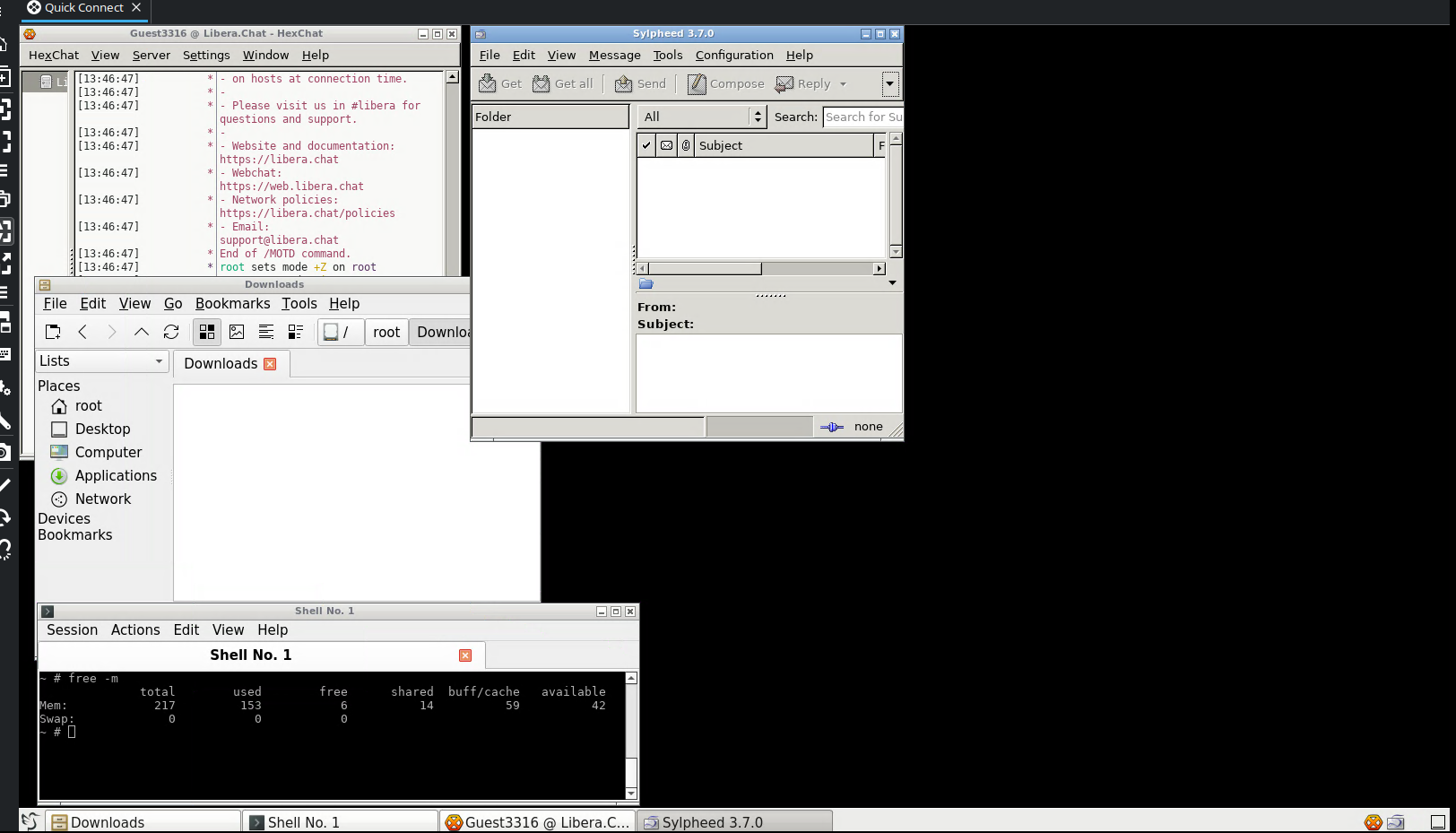
Full graphical desktop on the minimised Alpine 3.23 system built in the first guide. It targets a more capable desktop experience with a proper application menu, graphical email, IRC, and file management. It is an alternative to the 128MB WindowMaker path, probably about as functional as a G3 mac in reality but a bit of fun.
This guide assumes the minimised Alpine 3.23 base from the first guide. Starting from a stock Alpine install will produce different results.
Minimum RAM: 256MB. Minimum disk: 2GB.
Before
End state of the minimisation guide on a 256MB / 2GB instance, after expanding the partition which I wont cover, I assume you can or will just start with the right size disk.
              total        used        free      shared  buff/cache   available
Mem:            217          26         152           0          39         183
Swap:             0           0           0
Filesystem Size Used Available Use% Mounted on
/dev/vda 1.9G 72.0M 1.7G 4% /Choices made
Desktop environment: LXQt. LXDE (which is probably to big anyway) is not packaged for Alpine 3.23. LXQt 2.3.0 is available in the community repository and is the lightest full desktop environment available. It uses Openbox as its window manager and lxqt-panel for the taskbar, which implements the XDG menu specification correctly (So if you install something, it is pretty much always in the menu without extra configuration.)
Remote access: XRDP. Same rationale as the 128MB guide. Native RDP support on Windows, sessions persist across disconnections.
File manager: PCManFM-Qt. Included in lxqt-desktop. Replaces xfe.
Terminal: QTerminal. Included in lxqt-desktop. Replaces xterm.
Image viewer: LXImage-Qt. Native LXQt image viewer with a proper .desktop file.
Calculator: Qalculate-Qt. Full-featured Qt calculator. The Alpine xcalc package does not ship a .desktop file and would not appear in the menu without a manual workaround.
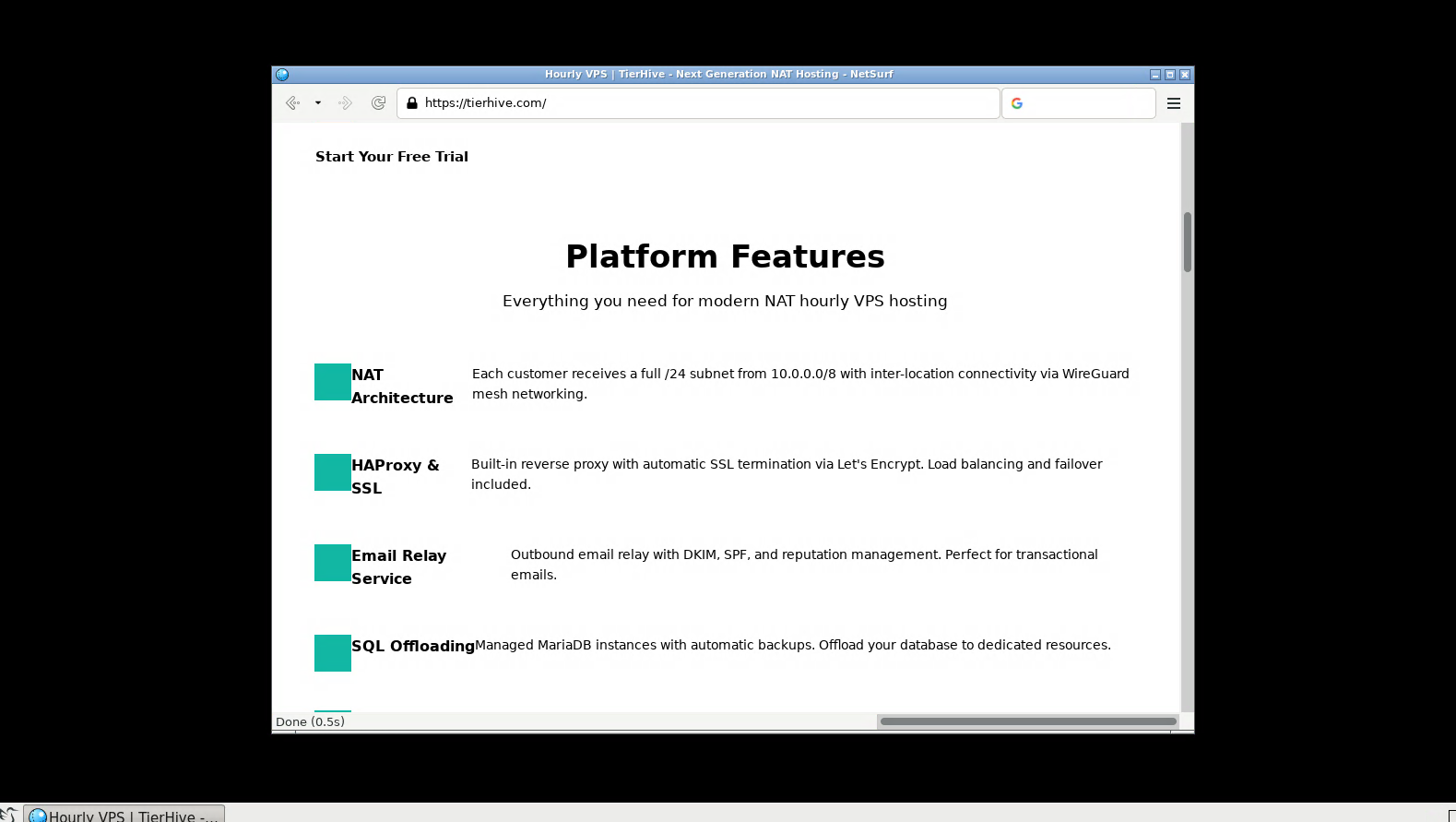
Browser: NetSurf. Lightweight GTK3 browser. JavaScript is non-functional in NetSurf. Firefox ESR and Chromium are in the Alpine repositories but both require significantly more than 256MB RAM to run. JavaScript-capable browsing is not viable at this memory tier.
Email: Sylpheed. Lightweight GTK2 graphical email client. Account setup is handled through a GUI wizard on first launch. No Qt mail client with an acceptable dependency chain is available in the Alpine 3.23 repositories.
IRC: HexChat. GTK2 graphical IRC client. No lightweight Qt IRC client is available in the Alpine 3.23 repositories.
PDF viewer: MuPDF. Same as the 128MB guide.
System utilities: htop, fastfetch, scrot, mc. CLI tools, no change from the 128MB guide.
A note on Mesa
Installing xorg-server on Alpine 3.23 pulls in the full Mesa stack including LLVM. This adds approximately 250MB to disk and is unavoidable. It is a hard dependency of the Alpine xorg-server package.
A note on breeze-icons
LXQt's default icon theme is Breeze. The Alpine lxqt-desktop package does not declare it as a dependency. Without it, the desktop loads with broken or missing icons throughout. It must be installed explicitly if you want fancy icons, but as this is stripped down, you probably dont care.
A note on dbus
LXQt requires dbus-launch to start a session bus. The Alpine dbus package does not include dbus-launch it is in the separate dbus-x11 package. Both must be installed or the session exits immediately on connect.
Stage 1: Install the desktop stack
Stop any active session before running package operations. On a 256MB system, running apk with an active desktop session risks the OOM killer terminating apk mid-operation, which corrupts the package database.
The minimisation guide removed OpenSSH and its dependencies including OpenSSL. The xrdp post-install script uses the openssl CLI to generate its RSA key pair. Install it first and like the last time remove it after.
xorgxrdpdoes not pull inxorg-serveras a dependency on Alpine. Install it explicitly or Xorg will not be present and sessions will fail to start.
apk add openssl
apk add lxqt-desktop xrdp xorgxrdp xorg-server breeze-icons dbus dbus-x11 lximage-qt netsurf sylpheed hexchat qalculate-qt mupdf font-misc-misc font-dejavu fastfetch scrot htop mc
apk del openssl
rm -rf /var/cache/apk/*
Total: approximately 800MB of disk. The dominant costs are LLVM (Mesa software renderer), the Breeze icon theme, and the LXQt component stack.
Stage 2: Configure xrdp
Set the colour depth:
(helps with dynamic resize on the rdp client)
sed -i 's/max_bpp=16/max_bpp=32/' /etc/xrdp/xrdp.iniSet the session limit:
sed -i 's/MaxSessions=50/MaxSessions=1/' /etc/xrdp/sesman.iniSet the session startup script:
cat > /etc/xrdp/startwm.sh << 'EOF'
#!/bin/sh
exec startlxqt
EOF
chmod +x /etc/xrdp/startwm.sh
Set a root password if one is not already set. xrdp authenticates via PAM and requires a password:
passwd rootStage 3: Enable services
rc-update add dbus default
rc-update add xrdp default
rc-update add xrdp-sesman default
rc-service dbus start
rc-service xrdp start
rc-service xrdp-sesman start
xrdp listens on port 3389. On a NAT VPS, forward an external port to 3389 in your favourite NAT provider's portal.
Stage 4: Configure LXQt for the VPS environment
LXQt is designed for physical machines. Several components it starts by default have no purpose on a headless KVM VPS and must be disabled explicitly. All configuration below is written to user-level paths under /root/.config/, which take precedence over system defaults without modifying package-managed files.
Disable autostart entries with no purpose on a VPS.
The XDG autostart specification allows entries to be suppressed with Hidden=true in a user-level override:
mkdir -p /root/.config/autostart

for entry in lxqt-powermanagement lxqt-xscreensaver-autostart at-spi-dbus-bus xdg-user-dirs; do
    printf '[Desktop Entry]\nHidden=true\n' > /root/.config/autostart/${entry}.desktop
donelxqt-powermanagement- battery and ACPI power management. No battery, no physical power button on a VPS.lxqt-xscreensaver-autostart- screensaver. No physical screen to protect.at-spi-dbus-bus- accessibility framework. No use on a single-user headless VPS.xdg-user-dirs- creates and updates~/Desktop,~/Documentsetc. Not needed.
Configure the panel. Remove plugins that require hardware the VPS does not have, and switch to a classic cascading menu:
mkdir -p /root/.config/lxqt
cat > /root/.config/lxqt/panel.conf << 'EOF'
panels=panel1

[panel1]
plugins=mainmenu,taskbar,statusnotifier,tray,worldclock,showdesktop
position=Bottom
desktop=0

[mainmenu]
type=mainmenu
alignment=Left

[taskbar]
type=taskbar
buttonWidth=220
closeOnMiddleClick=true
groupingEnabled=false

[worldclock]
type=worldclock

[showdesktop]
alignment=Right
type=showdesktop

[statusnotifier]
alignment=Right
type=statusnotifier

[tray]
type=tray
EOF
Removed plugins:
volume- no audio hardwaremount- no removable mediadesktopswitch- only one desktopquicklaunch- empty by default, replaced by the application menu
Configure the session. The default cursor theme (whiteglass) is not installed on Alpine. Set it to breeze:
cat > /root/.config/lxqt/session.conf << 'EOF'
[General]
leave_confirmation=false

[Environment]
GTK_CSD=0
GTK_OVERLAY_SCROLLING=0

[Mouse]
cursor_size=24
cursor_theme=breeze
acc_factor=20
acc_threshold=10
left_handed=false

[Keyboard]
delay=500
interval=30
beep=false

[Font]
antialias=true
hinting=true
dpi=96
EOF
Configure Openbox. Set one desktop and disable animations:
mkdir -p /root/.config/openbox
cp /etc/xdg/openbox/rc.xml /root/.config/openbox/lxqt-rc.xml
sed -i 's/<number>4<\/number>/<number>1<\/number>/' /root/.config/openbox/lxqt-rc.xml
sed -i 's/<animateIconify>yes<\/animateIconify>/<animateIconify>no<\/animateIconify>/' /root/.config/openbox/lxqt-rc.xml
sed -i 's/<drawContents>yes<\/drawContents>/<drawContents>no<\/drawContents>/' /root/.config/openbox/lxqt-rc.xml
sed -i 's/<focusDelay>200<\/focusDelay>/<focusDelay>0<\/focusDelay>/' /root/.config/openbox/lxqt-rc.xml
sed -i 's/<popupTime>875<\/popupTime>/<popupTime>0<\/popupTime>/' /root/.config/openbox/lxqt-rc.xml
Configure the desktop. Remove the Computer and Trash icons. Both require gvfs to function, which pulls in the full GNOME stack (yes, really haha!, GStreamer, GTK4, GNOME Online Accounts etc) at a cost of over 300MB. The trade-off is not worth it on a 2GB disk:
mkdir -p /root/.config/pcmanfm-qt/lxqt
cat > /root/.config/pcmanfm-qt/lxqt/settings.conf << 'EOF'
[System]
Archiver=lxqt-archiver

[Desktop]
ShowTrash=false
ShowComputer=false
ShowHomeDir=true
EOF
Connecting
Use any RDP client. On Windows, the built-in Remote Desktop Connection works without additional software. On Linux, Remmina or xfreerdp both work.
Connect to your external IP and forwarded port. Log in as root with the password set above.
Using LXQt
LXQt uses a conventional taskbar layout.
- Application menu: the button at the left of the taskbar. Applications are grouped by category and populated automatically from installed packages.
- Right-click the desktop for an Openbox menu with session options.
- Minimised windows appear in the taskbar centre.
After (with all applications running)
               total        used        free      shared  buff/cache   available
  Mem:            217         168          14          11          35          24
  Swap:             0           0           0
Filesystem Size Used Available Use% Mounted on
/dev/vda 1.9G 799.0M 1.0G 44% /RAM at idle with xrdp and dbus running is approximately 45MB. An active LXQt session with no applications open consumes approximately 150MB, leaving around 60MB headroom for applications.
Do your package management before connecting
On a 256MB system, running apk with an active desktop session risks OOM-killing apk mid-operation, which corrupts the package database. Always stop the session manager before running package operations:
rc-service xrdp-sesman stop
# run apk operations
rc-service xrdp-sesman start
Or just make sure you close everything first.
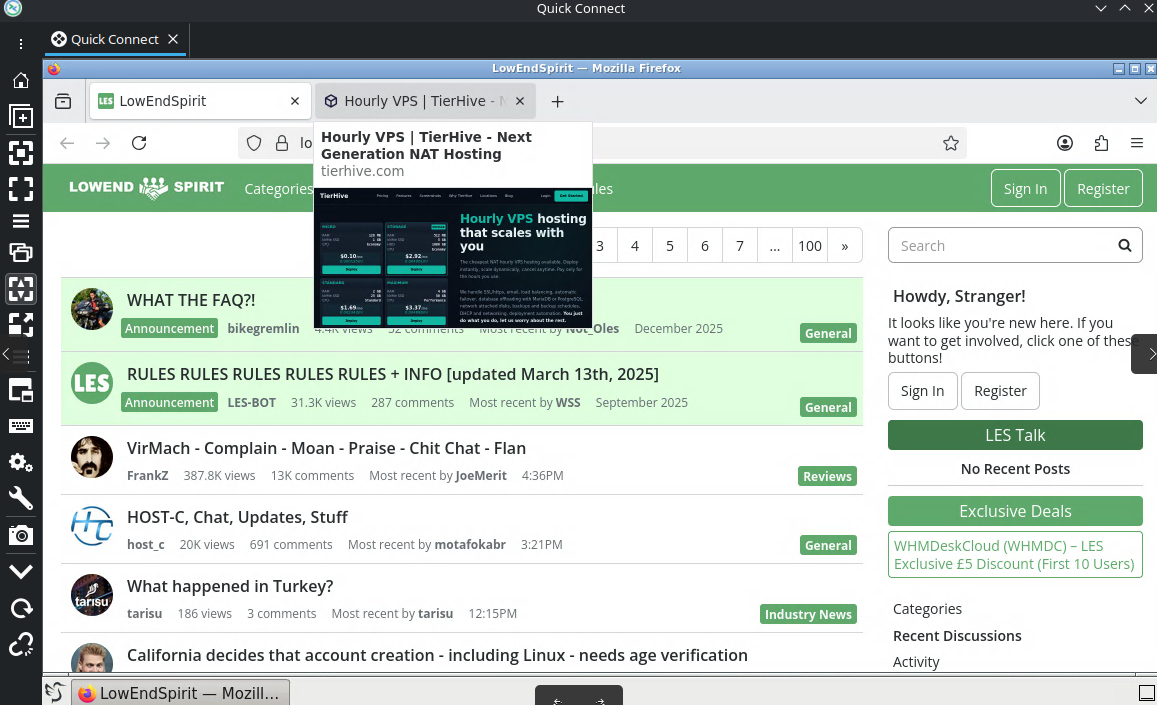
Optional: Adding Firefox ESR (512 MB tier)
NetSurf covers basic browsing at the 256MB tier. If you want a modern browser that handles current websites, Firefox ESR is available in the Alpine repositories but requires more RAM.
Testing results:
| RAM | Result |
|---|---|
| 256MB | Firefox will not open |
| 512MB | Opens. One tab maximum. 41MB headroom. Fragile. |
| 768MB | Reliable single-tab browsing with accepted remote desktop limitations |
Upgrade the VPS to 768MB before proceeding.
Remove NetSurf and install Firefox ESR:
apk del netsurf
apk add firefox-esr
rm -rf /var/cache/apk/*
Create the wrapper script. Firefox is launched through this rather than directly. The environment variables set here cannot be set in the preferences file.
cat > /usr/local/bin/firefox-esr << 'EOF'
#!/bin/sh
# Single malloc arena on single core there is no thread contention,
# multiple arenas only waste memory on heap metadata
export MALLOC_ARENA_MAX=1
export MALLOC_TRIM_THRESHOLD_=65536
export MALLOC_MMAP_THRESHOLD_=131072
# Use EGL instead of GLX skips the GLX extension stack
export MOZ_X11_EGL=1
export MOZ_DISABLE_RDD_SANDBOX=1
# Prevent GTK loading the AT-SPI accessibility bridge
export NO_AT_BRIDGE=1
export MESA_NO_ERROR=1
exec /usr/lib/firefox-esr/firefox-esr "$@"
EOF
chmod +x /usr/local/bin/firefox-esr
Override the desktop entry to use the wrapper:
cat > /usr/local/share/applications/firefox-esr.desktop << 'EOF'
[Desktop Entry]
Type=Application
Name=Firefox ESR
GenericName=Web Browser
Exec=/usr/local/bin/firefox-esr %u
Terminal=false
StartupNotify=false
StartupWMClass=firefox-esr
Categories=Network;WebBrowser;
EOF
Launch Firefox once and close it immediately. (pkill firefox*) Firefox creates its own profile directory on first launch and writes an installs.ini file that locks itself to that profile, overriding any profile configured in advance. The profile path cannot be known until after this first launch. Connect via RDP, open Firefox from the application menu, wait for it to appear, then close it.
Back in the SSH session, find the profile Firefox created:
PROFILE=$(find /root/.mozilla/firefox -name "prefs.js" | head -1 | xargs dirname)Write the memory configuration to that profile. Firefox reads user.js on every startup and applies these preferences before anything else loads:
cat > $PROFILE/user.js << 'EOF'
// === Process model ===
user_pref("dom.ipc.processCount", 1);
user_pref("dom.ipc.processCount.webIsolated", 1);
user_pref("dom.ipc.processCount.file", 1);
user_pref("fission.autostart", false);
user_pref("dom.ipc.useSocketProcess", false);

// === Content sandbox ===
user_pref("security.sandbox.content.level", 0);

// === JavaScript JIT ===
user_pref("javascript.options.baselinejit", false);
user_pref("javascript.options.ion", false);
user_pref("javascript.options.native_regexp", false);
user_pref("javascript.options.wasm", false);
user_pref("javascript.options.wasm_baselinejit", false);
user_pref("javascript.options.wasm_optimizingjit", false);
user_pref("javascript.options.discardSystemSource", true);

// === JavaScript heap and GC ===
user_pref("javascript.options.mem.max", 64);
user_pref("javascript.options.mem.high_water_mark", 32);
user_pref("javascript.options.mem.gc_max_empty_chunk_count", 1);
user_pref("javascript.options.mem.gc_min_empty_chunk_count", 0);

// === Single core ===
user_pref("javascript.options.parallel-parsing", false);
user_pref("dom.workers.maxPerDomain", 2);
user_pref("layout.frame_rate", 24);

// === Graphics ===
user_pref("webgl.disabled", true);
user_pref("webgl.enable-webgl2", false);
user_pref("layers.acceleration.disabled", true);
user_pref("gfx.canvas.accelerated", false);
user_pref("media.hardware-video-decoding.enabled", false);
user_pref("media.hardware-video-decoding.force-enabled", false);
user_pref("media.ffmpeg.vaapi.enabled", false);

// === Fonts ===
user_pref("gfx.font_rendering.graphite.enabled", false);
user_pref("gfx.font_rendering.opentype_svg.enabled", false);
user_pref("layout.spellcheckDefault", 0);

// === Cache ===
user_pref("browser.cache.disk.enable", false);
user_pref("browser.cache.memory.enable", false);

// === Image memory ===
user_pref("image.mem.max_decoded_image_kb", 512);
user_pref("image.mem.decode_bytes_at_a_time", 4096);
user_pref("image.cache.size", 1048576);

// === Safe Browsing ===
user_pref("browser.safebrowsing.malware.enabled", false);
user_pref("browser.safebrowsing.phishing.enabled", false);
user_pref("browser.safebrowsing.downloads.enabled", false);
user_pref("browser.safebrowsing.downloads.remote.enabled", false);
user_pref("browser.safebrowsing.blockedURIs.enabled", false);

// === Tracking protection ===
user_pref("privacy.trackingprotection.enabled", false);
user_pref("privacy.trackingprotection.pbmode.enabled", false);
user_pref("privacy.trackingprotection.socialtracking.enabled", false);

// === Startup ===
user_pref("browser.startup.homepage", "about:blank");
user_pref("browser.startup.page", 0);
user_pref("browser.sessionstore.resume_from_crash", false);
user_pref("browser.sessionstore.interval", 60000);
user_pref("browser.sessionstore.max_tabs_undo", 0);
user_pref("browser.sessionstore.max_windows_undo", 0);
user_pref("browser.sessionhistory.max_entries", 5);
user_pref("browser.newtabpage.enabled", false);
user_pref("browser.newtab.preload", false);
user_pref("browser.aboutwelcome.enabled", false);
user_pref("browser.laterrun.enabled", false);
user_pref("startup.homepage_override_url", "");
user_pref("startup.homepage_welcome_url", "");
user_pref("startup.homepage_welcome_url.additional", "");
user_pref("datareporting.policy.dataSubmissionPolicyBypassNotification", true);

// === Network ===
user_pref("network.prefetch-next", false);
user_pref("network.dns.disablePrefetch", true);
user_pref("network.predictor.enabled", false);
user_pref("network.http.speculative-parallel-limit", 0);
user_pref("network.http.max-connections", 6);
user_pref("network.http.max-persistent-connections-per-server", 2);
user_pref("network.http.max-persistent-connections-per-proxy", 2);
user_pref("network.dnsCacheEntries", 50);
user_pref("network.http.http3.enabled", false);
user_pref("network.websocket.enabled", false);
user_pref("network.captive-portal-service.enabled", false);
user_pref("network.connectivity-service.enabled", false);

// === Geolocation ===
user_pref("geo.enabled", false);
user_pref("geo.provider.network.url", "");
user_pref("browser.region.network.scan.enabled", false);
user_pref("browser.region.update.enabled", false);

// === Media ===
user_pref("media.peerconnection.enabled", false);
user_pref("media.eme.enabled", false);
user_pref("media.ffmpeg.enabled", false);
user_pref("media.autoplay.default", 5);
user_pref("media.webspeech.recognition.enable", false);
user_pref("media.webspeech.synth.enabled", false);

// === DOM ===
user_pref("dom.push.enabled", false);
user_pref("dom.serviceWorkers.enabled", false);
user_pref("dom.battery.enabled", false);
user_pref("dom.gamepad.enabled", false);
user_pref("dom.vr.enabled", false);
user_pref("dom.webnotifications.enabled", false);

// === Accessibility ===
user_pref("accessibility.force_disabled", 1);

// === URL bar ===
user_pref("browser.urlbar.suggest.searches", false);
user_pref("browser.urlbar.suggest.history", false);
user_pref("browser.urlbar.suggest.bookmark", false);
user_pref("browser.urlbar.suggest.topsites", false);
user_pref("browser.urlbar.maxRichResults", 0);
user_pref("browser.search.suggest.enabled", false);

// === Activity Stream ===
// Activity Stream is the new tab framework. It is separate from
// browser.newtabpage.enabled and loads React, feeds, and telemetry
// independently. Both must be disabled.
user_pref("browser.newtabpage.activity-stream.enabled", false);
user_pref("browser.newtabpage.activity-stream.feeds.topsites", false);
user_pref("browser.newtabpage.activity-stream.feeds.system.topsites", false);
user_pref("browser.newtabpage.activity-stream.feeds.section.topstories", false);
user_pref("browser.newtabpage.activity-stream.feeds.system.topstories", false);
user_pref("browser.newtabpage.activity-stream.feeds.telemetry", false);
user_pref("browser.newtabpage.activity-stream.telemetry", false);
user_pref("browser.newtabpage.activity-stream.showSponsored", false);
user_pref("browser.newtabpage.activity-stream.showSponsoredTopSites", false);
user_pref("browser.newtabpage.activity-stream.default.sites", "");
user_pref("browser.newtabpage.activity-stream.discoverystream.enabled", false);
user_pref("browser.newtabpage.activity-stream.feeds.discoverystreamfeed", false);
user_pref("browser.topsites.contile.enabled", false);

// === Features ===
user_pref("browser.pocket.enabled", false);
user_pref("extensions.pocket.enabled", false);
user_pref("browser.formfill.enable", false);
user_pref("signon.rememberSignons", false);
user_pref("places.history.enabled", false);
user_pref("pdfjs.disabled", true);
user_pref("reader.parse-on-load.enabled", false);
user_pref("browser.pagethumbnails.capturing_disabled", true);

// === Built-in extensions ===
user_pref("extensions.webcompat.enabled", false);
user_pref("extensions.webcompat-reporter.enabled", false);
user_pref("extensions.htmlaboutaddons.recommendations.enabled", false);
user_pref("extensions.htmlaboutaddons.discovery.enabled", false);

// === Normandy ===
// Normandy is Mozilla's remote experiment system. It can push changes
// that silently override preferences set in this file.
user_pref("app.normandy.enabled", false);
user_pref("app.normandy.api_url", "");

// === Telemetry ===
user_pref("toolkit.telemetry.enabled", false);
user_pref("toolkit.telemetry.unified", false);
user_pref("toolkit.telemetry.firstShutdownPing.enabled", false);
user_pref("toolkit.telemetry.newProfilePing.enabled", false);
user_pref("toolkit.telemetry.shutdownPingSender.enabled", false);
user_pref("toolkit.telemetry.bhrPing.enabled", false);
user_pref("toolkit.telemetry.updatePing.enabled", false);
user_pref("datareporting.healthreport.uploadEnabled", false);
user_pref("datareporting.policy.dataSubmissionEnabled", false);
user_pref("app.shield.optoutstudies.enabled", false);
user_pref("browser.discovery.enabled", false);
user_pref("browser.messaging-system.whatsNewPanel.enabled", false);
user_pref("breakpad.reportURL", "");
user_pref("browser.crashReports.unsubmittedCheck.enabled", false);
user_pref("extensions.getAddons.cache.enabled", false);

// === UI ===
user_pref("browser.shell.checkDefaultBrowser", false);
user_pref("browser.tabs.firefox-view", false);
user_pref("browser.migration.enabled", false);
user_pref("browser.uitour.enabled", false);

// === Updates ===
user_pref("app.update.enabled", false);
user_pref("app.update.auto", false);
user_pref("extensions.update.enabled", false);
user_pref("extensions.update.autoUpdateDefault", false);

// === Tab memory ===
user_pref("browser.tabs.unloadOnLowMemory", true);
EOF
Relaunch Firefox. It should open to a blank tab with no additional tabs and no first-run pages, honestly I messed with this for hours, I might have met myself coming back a few times, so any feedback from anyone who tested this is welcome.
After, Firefox opens with one or 2 tabs loaded at 512MB on LXQt:
              total        used        free      shared  buff/cache   available
Mem:            469         390          12          26          66          41
At 640/768MB there is sufficient headroom for reliable use. One tab at a time. Video playback sort of works, but you have to set your defaults super low and thats not really what this is for, but YT opens, and extensions are not really viable at this tier.
Screenshots
512mb with firefox example (Honestly though, you should use 640 or 768mb really):