Locate your VPS available public Ports
Summary
Your nat VPS is provided with 2 open TCP ports and 2 UDP port. By design the 1st TCP port is mapped to your VPS port 22/TCP.
In the following text, HV stands for Hypervisor and VPS is your VPS.
Using the panel
In the panel, the page Subnet Config reveal your mapped ports
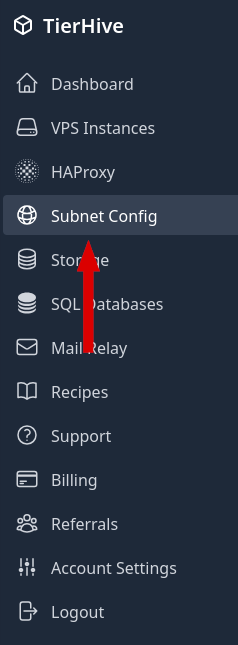
That page displays your allocated IP and ports.
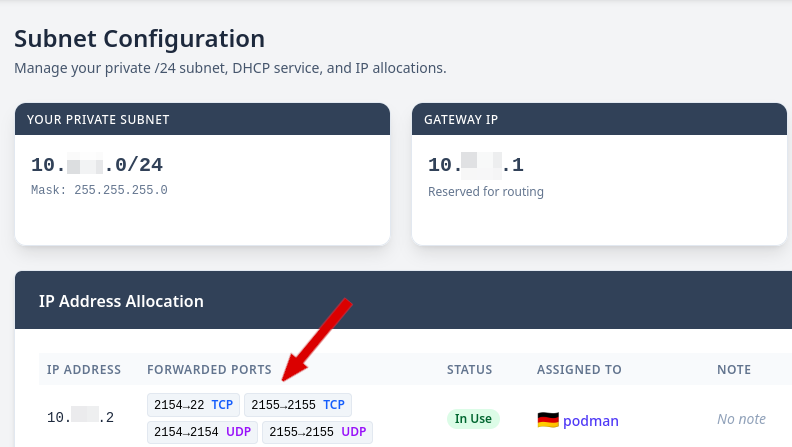
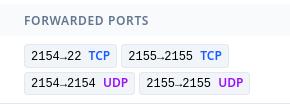
In that example, you can see that the external port 2154/TCP HV is mapped to 22/TCP VPS, 2155/TCP HV to 2155/TCP VPS and 2154/UDP HV, 2155/UDP HV to their VPS equivalent.
The HV related public IP is found in the VPS Instances page in te row related to your VPS

Using Recipes
If you are deploynig your VPS using a recipe, a token in /opt/th-simple-token is created and the information are ready to get downloaded
curl "https://control.tierhive.com/simple/netinfo?token=$(cat /opt/th-simple-token)" -o /tmp/portsThat file, located at /tmp/ports contains:
local_ip=10.x.x.x #your local IP
external_ip=x.y.z.w #The Hypervisor public IP
tcp_1=2154 #External TCP port 1, mapped to your 22/TCP
tcp_2=2155 #External TCP port 2
udp_1=2154 #External UDP port 1,
udp_2=2155 #External UDP port 2
Please remember that recipe takes time at the end of deployment, please wait a couple of minutes max.