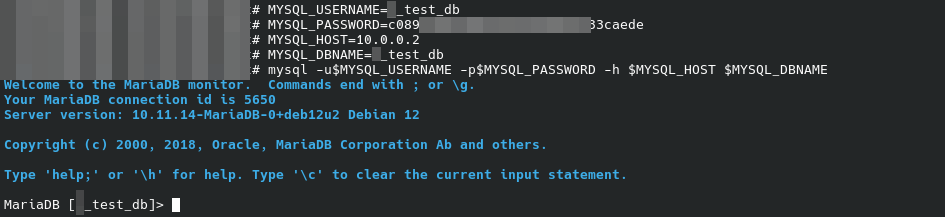
Connect to Tierhive mysql DB using CLI
Summary
When connecting to TierHive MySQL database using the CLI, you will encounter the "ERROR 2026 (HY000): TLS/SSL error: SSL is required, but the server does not support it " error.
CLI tool
To connect the database, you need in most situation the mysql client (mariadb-client when using Debian GNU/Linux).
apt update
apt install mariadb-client
Use your package manager instead of apt, dnf for RH, pacman for Arch, ...
Configuration
Create a .my.cnf file in you home directory to automatically enable the --skip_ssl option
cat << EOF > ${HOME}/.my.cnf
[client]
skip-ssl = true
EOF
Usage
Collect the credentials from the SQL Databases then Manage in the panel
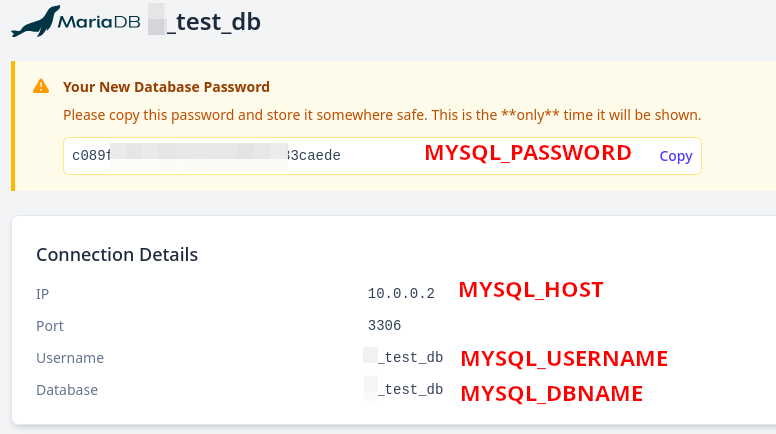
In your shell run the following command after having added the collected credentials
MYSQL_USERNAME=
MYSQL_PASSWORD=
MYSQL_HOST=
MYSQL_DBNAME=

mysql -u$MYSQL_USERNAME -p$MYSQL_PASSWORD -h $MYSQL_HOST $MYSQL_DBNAME